Introduction
If you want your WordPress website to rank higher on Google, on-page SEO is where you start. Before building backlinks or running paid ads, every page on your site needs to be properly optimized — for both search engines and real human visitors.
The good news is that on-page SEO doesn’t have to be complicated. This on-page SEO checklist for WordPress walks you through every step that actually moves the needle in 2026 — from keyword research and title tags all the way to page speed and mobile optimization. Follow it for every post and page you publish, and you’ll consistently give your content the best possible shot at ranking.
What Is On-Page SEO and Why Does It Matter?
On-page SEO refers to everything you do directly on your web pages to improve their search engine visibility. This includes your content, headings, meta tags, images, internal links, and page speed — all the elements you control directly.
In 2026, Google evaluates pages not just for keywords, but for whether the content genuinely solves a problem for the searcher. That means great on-page SEO is really about creating well-structured, fast-loading, clearly written pages that match what people are actually looking for.
Before You Write: Keyword Research
On-page SEO starts before you type a single word. Every page should be built around one clear primary keyword.
Step 1: Choose a primary keyword
Pick one focused keyword (or keyphrase) per page. Targeting too many keywords on a single page dilutes your focus and confuses both Google and your readers. If you want to rank for multiple different terms, create separate pages for each.
Step 2: Check search intent
Before writing, search your keyword on Google and look at what’s already ranking. Ask yourself:
- Are the top results guides, lists, product pages, or something else?
- What questions are they answering?
- How long and detailed are they?
Match the format and depth of what’s already working. If Google is ranking step-by-step tutorials for your keyword, publish a step-by-step tutorial — not a short opinion piece.
Step 3: Identify secondary keywords
Use two to three related secondary keywords naturally throughout your content. These are variations and related terms that people searching for your topic also use. Tools like Google Search Console, Ubersuggest, or even Google’s autocomplete suggestions are free starting points.
The On-Page SEO Checklist: Step by Step
1. Optimize Your SEO Title (Title Tag)
Your SEO title is the clickable blue text that appears in Google search results. It’s one of the most important on-page elements.
Best practices:
- Keep it under 60 characters — titles over 60 characters are more likely to be cut off or rewritten by Google
- Include your primary keyword naturally, ideally near the beginning
- Make it specific and compelling — it should give a clear reason to click
- Every page must have a unique title
In WordPress, set your SEO title using Yoast SEO or Rank Math in the post editor — not just the post title itself, which may be formatted differently.
2. Write a Click-Worthy Meta Description
Meta descriptions don’t directly affect rankings, but they directly affect click-through rates — which does affect your traffic.
Best practices:
- Keep it between 140–160 characters
- Include your primary keyword naturally
- Write it like a mini advertisement: what will the reader get from clicking?
- Include a clear benefit or outcome
- Every page needs a unique meta description
Example of a weak meta description:
“This post is about on-page SEO for WordPress.”
Example of a strong meta description:
“A step-by-step on-page SEO checklist for WordPress — covering titles, meta tags, images, speed, and everything you need to rank higher in 2026.”
3. Set a Clean, Keyword-Focused URL Slug
Your URL slug should be short, readable, and contain your primary keyword.
Best practices:
- Use hyphens to separate words (not underscores)
- Keep it short —
/on-page-seo-checklist/beats/on-page-seo-checklist-for-wordpress-websites-in-2026/ - Avoid dates in URLs unless the content is genuinely time-sensitive
- Once a URL is indexed and earning traffic, don’t change it — or set up a 301 redirect if you must
In WordPress: Settings → Permalinks → choose “Post name” for clean URLs across your entire site.
4. Use Headings to Structure Your Content
Headings (H1, H2, H3) help both readers and search engines understand what your page is about. Think of them as a table of contents for your content.
Best practices:
- Use one H1 per page — this is your main title
- Use H2s for main sections and H3s for subsections within those sections
- Include your primary keyword in your H1 naturally
- Include related keywords in some H2 headings — but only where it reads naturally, never forced
- Keep headings descriptive so readers can scan and find what they need quickly
In WordPress and Elementor, check that your heading tags are set correctly — the visual size of a heading doesn’t always match the HTML tag being used underneath.
5. Place Your Keyword in the First Paragraph
Google pays extra attention to the beginning of your content. Include your primary keyword naturally in the first paragraph (first 100–150 words), so both Google and readers immediately understand what the page is about.
This doesn’t mean stuffing the keyword awkwardly into the first sentence. Write the introduction naturally — the keyword should appear because it’s the topic, not because you forced it in.
6. Maintain Natural Keyword Density
Keyword density is how often your focus keyword appears relative to total word count. In 2026, the goal is natural usage — not a specific percentage.
Practical approach:
- Use your primary keyword a few times throughout the content where it reads naturally
- Use synonyms and related phrases the rest of the time
- Read your content out loud — if it sounds like you’re repeating the same phrase too often, you probably are
Yoast SEO’s “Keyphrase density” indicator is a useful guide, but don’t chase a specific number at the expense of readability.
7. Add Internal Links
Internal links connect your pages to each other. They help Google understand your site’s structure, spread authority across pages, and keep visitors exploring your content longer.
Best practices:
- Every post should link to at least two or three other relevant posts or pages on your site
- Use descriptive anchor text — “read my Wordfence security guide” is better than “click here”
- Make sure the pages you link to are genuinely relevant to what the reader just read
- Regularly add internal links to older posts when you publish new relevant content
8. Include Outbound Links to Authoritative Sources
Linking to high-quality external sources (like official documentation, research studies, or reputable tools) signals to Google that your content is research-backed and trustworthy. It also adds value for your readers.
Examples of good outbound links:
- Linking to Google Search Console when discussing how to track keyword rankings
- Linking to Google PageSpeed Insights when discussing page speed
- Citing a study or original source when making a data-backed claim
Aim for at least one or two outbound links per post. Open them in a new tab so visitors stay on your site.
9. Optimize Every Image
Images contribute to both SEO and page performance. Every image needs three things:
a) Descriptive file name Rename your image file before uploading. wordpress-seo-checklist-2026.jpg is better than IMG_4892.jpg.
b) Alt text with keyword Alt text describes the image to search engines and screen readers. Include your primary keyword or a natural variation in the alt text of at least one image per post. Keep it descriptive and accurate — don’t stuff keywords.
c) Compression Large images slow your site down significantly. Use a plugin like ShortPixel to automatically compress images on upload, or compress them manually with TinyPNG before uploading.
10. Make Sure Your Page Loads Fast
Page speed is a confirmed Google ranking factor — and it directly impacts user experience. A 0.1 second improvement in load time has been shown to meaningfully improve conversion rates.
Quick speed wins for WordPress:
- Compress and resize images before uploading
- Use a lightweight theme (Hello Elementor, Astra, GeneratePress)
- Install a caching plugin (LiteSpeed Cache for Hostinger users is a great free option)
- Limit the number of plugins you use — each one adds load time
- Use a CDN (Cloudflare has a free tier that helps serve your site faster globally)
Check your score anytime at Google PageSpeed Insights — it’s free and tells you exactly what to fix.
11. Confirm Your Page Is Mobile-Friendly
Google uses mobile-first indexing — meaning it evaluates your mobile site for rankings, not your desktop version. If your mobile experience is poor, your rankings will suffer regardless of how good your desktop site looks.
How to check:
- Use Google’s Mobile-Friendly Test (free)
- Open your site on your actual phone and scroll through every section
- Test all buttons, forms, and links on a touch screen
In Elementor, always preview and adjust your design in mobile view before publishing any page or post.
12. Write Content That Satisfies Search Intent
This is the highest-level on-page SEO principle of 2026: your content needs to fully answer the question someone had when they searched your keyword.
Google’s goal is to surface the most useful, complete answer to any query. That means:
- Don’t write a short, thin post for a topic that needs depth
- Don’t pad a simple topic with unnecessary length just to hit a word count
- Structure your content so readers can quickly find the specific answer they need
- Cover the topic thoroughly — address related questions, common mistakes, and practical next steps
If you’re not sure what questions to answer, search your keyword on Google and look at the “People Also Ask” section — these are real questions people are searching.
On-Page SEO Checklist: Quick Reference
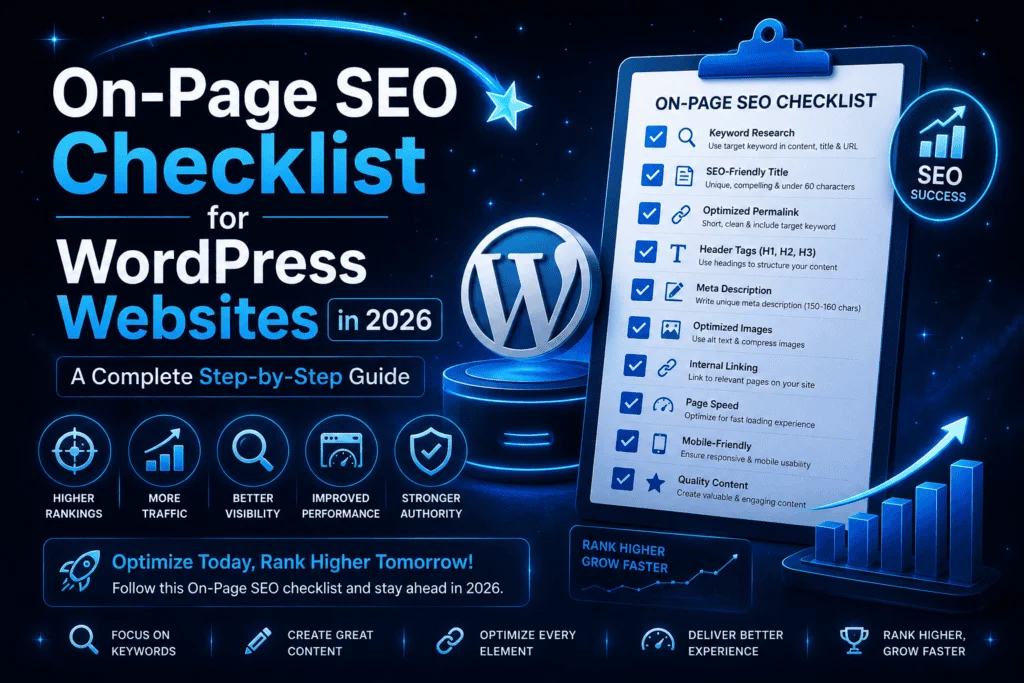
Before publishing any WordPress post or page, run through this quick checklist:
- Primary keyword chosen and search intent confirmed
- SEO title includes keyword, under 60 characters
- Meta description is unique, 140–160 characters, includes keyword
- URL slug is short, keyword-focused, uses hyphens
- H1 includes primary keyword (only one H1 on page)
- Keyword appears naturally in first paragraph
- H2/H3 headings are descriptive, keyword used where natural
- 2–3 internal links to relevant content on your site
- 1–2 outbound links to authoritative external sources
- All images have descriptive alt text, compressed file sizes
- Page loads fast on mobile (tested with PageSpeed Insights)
- Mobile layout reviewed and confirmed in Elementor/mobile preview
- Content fully answers the search intent behind the keyword
Final Thoughts
On-page SEO in 2026 is less about hitting specific numbers and more about building pages that genuinely serve your readers. Follow this checklist consistently, and over time you’ll notice your pages ranking more reliably — because you’re giving Google exactly what it needs to understand and recommend your content.
As a freelance WordPress developer, I apply this exact checklist to every site I build. If you want help building a WordPress site that’s fast, secure, and properly optimized from day one, get in touch — let’s build something worth ranking.
Related Posts You Might Like
- Modern Website Design Trends in 2026
- WordPress Security in 2026: The Complete Wordfence Setup Guide
- How AI Is Transforming WordPress in 2026
Found this checklist useful? Share it with someone building their first WordPress site — it might save them months of guesswork.